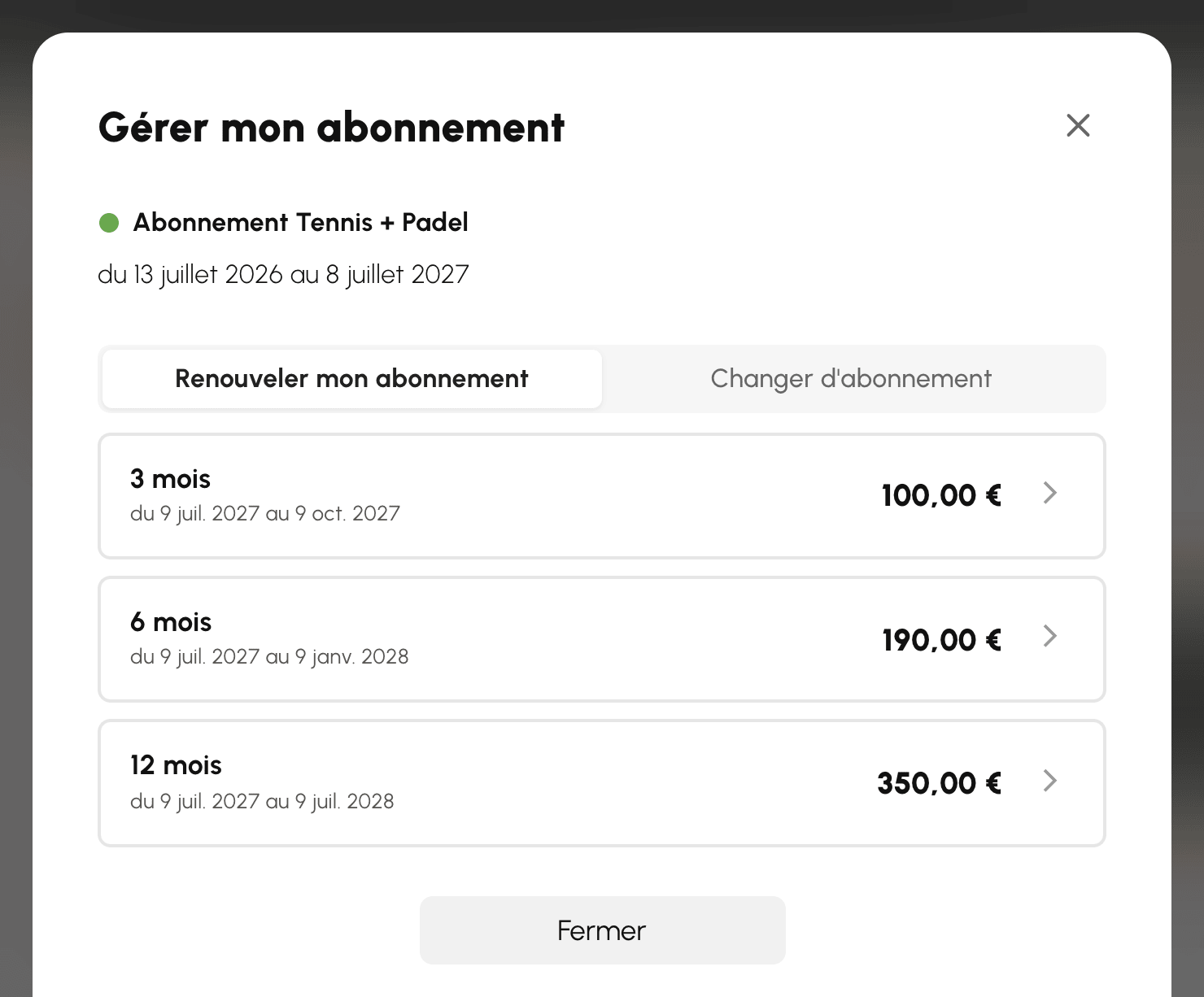



Vendre les abonnements en ligne
Laissez vos utilisateurs souscrire et renouveler eux-mêmes leur abonnement, avec paiement immédiat et attribution automatique des droits. Deux façons de vendre coexistent : à la durée, ou par saison.
Savoir où se configure la vente
La mise en vente d'un abonnement ne se configure pas depuis le catalogue de produits, mais depuis la fiche de l'abonnement lui-même.
- Rendez-vous dans Administration›Utilisateurs›Droits d'accès›Abonnements et ouvrez l'abonnement concerné.
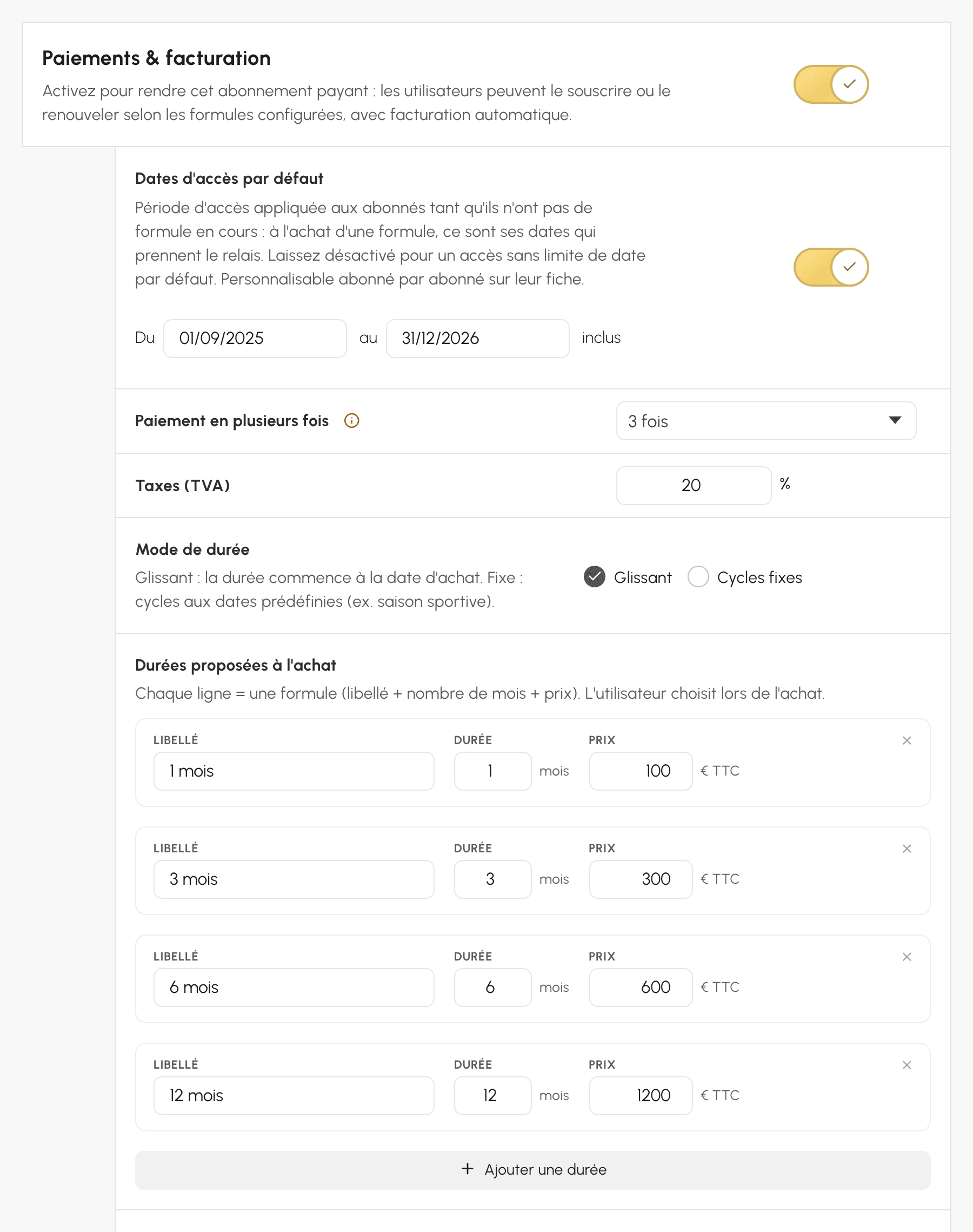
- Dans l'onglet Général, activez la rubrique Paiements & facturation.
- Le produit correspondant est créé automatiquement.
Une fois créé, ce produit apparaît dans Administration›Réglages›Facturation›Produits & services et reste modifiable des deux côtés.
Choisir entre durée glissante et cycles fixes
Le Mode de durée est la décision structurante : tout le reste en découle, et en changer plus tard suppose de reconfigurer les formules.
- Glissant : la période démarre au jour de l'achat. Vous vendez « trois mois », « un an », sans date de calendrier.
- Cycles fixes : vous vendez des périodes datées, identiques pour tout le monde. Vous vendez « la saison 2026-2027 », du 1er septembre au 31 août.
Posez-vous une seule question : deux personnes qui achètent à deux mois d'intervalle doivent-elles voir leur abonnement se terminer le même jour ?
- Oui : cycles fixes. C'est le cas d'une organisation dont la vie suit une saison sportive, avec une assemblée générale, une reprise et des licences alignées.
- Non : glissant. C'est le cas d'une salle qui accueille au fil de l'eau, où chacun paie douze mois à partir du jour où il s'inscrit.
Configurer une durée glissante
Sous Durées proposées à l'achat, chaque ligne est une formule : un Libellé, une Durée en mois et un Prix. Cliquez sur Ajouter une durée pour en proposer plusieurs, l'utilisateur choisit à l'achat.
Une grille à trois lignes suffit dans la plupart des cas :
| Libellé | Durée | Prix |
|---|---|---|
| 3 mois | 3 | 60 € |
| 6 mois | 6 | 105 € |
| 12 mois | 12 | 180 € |
La dégressivité n'est pas calculée pour vous : c'est à vous de rendre la formule longue plus intéressante, sinon personne ne la prendra.
Deux comportements méritent d'être connus, parce qu'ils évitent des réclamations :
- Le renouvellement ne fait perdre aucun jour : si l'utilisateur reconduit le même abonnement avant son expiration, la nouvelle période démarre le lendemain de la fin de l'actuelle, pas le jour de l'achat. Renouveler en avance ne coûte donc jamais de temps de jeu.
- Les fins de mois sont normalisées. Un achat de un mois effectué le 31 janvier se termine le 28 ou le 29 février, jamais le 3 mars. La durée reste la même quel que soit le jour d'achat.
Configurer des cycles fixes
Sous Cycles proposés à l'achat, chaque ligne est un cycle daté : un Libellé, une Période avec sa Date début et sa Date fin, et un Prix. Le bouton Ajouter un cycle permet d'en préparer plusieurs à l'avance.
| Libellé | Période | Prix |
|---|---|---|
| Saison 2026-2027 | 01/09/2026 → 31/08/2027 | 180 € |
| Saison 2027-2028 | 01/09/2027 → 31/08/2028 | 185 € |
Préparer la saison suivante dès maintenant ne présente aucun risque : un cycle terminé disparaît tout seul de l'offre, sans intervention de votre part. Vous pouvez donc laisser les anciennes saisons en place, elles ne seront jamais proposées à l'achat.
Calculer le prix au prorata
En cycles fixes, un utilisateur qui rejoint l'organisation en mars paierait la saison entière au tarif plein. Le Calcul du prix au prorata règle ce problème : le prix baisse à mesure que le cycle avance.
Trois Mode de calcul sont proposés :
- Par jours restants : le plus fin, le prix baisse chaque jour.
- Par mois restants : le prix baisse par paliers mensuels.
- Par trimestres restants : le prix baisse par paliers trimestriels, utile quand votre offre s'exprime déjà en trimestres.
Avant le début du cycle, le tarif plein s'applique : acheter la saison prochaine en avance ne donne aucune remise.
Deux planchers évitent le tarif dérisoire de fin de saison :
- Plancher pourcentage : pourcentage minimum du tarif plein. À 30 %, une saison à 180 € ne descendra jamais sous 54 €.
- Plancher montant absolu : montant minimum en euros, quel que soit le calcul.
Les deux se cumulent, et le plus élevé l'emporte. Un prorata ne peut jamais dépasser le tarif plein, même si un plancher absolu élevé s'applique à un cycle bon marché.
Si le prorata tombe à zéro et qu'aucun plancher n'est posé, la formule n'est pas proposée du tout, plutôt que d'être affichée puis refusée au paiement.
Encadrer le renouvellement
Le Comportement à expiration détermine ce qui se passe quand l'abonnement arrive à son terme :
- Manuel : l'utilisateur doit racheter de lui-même depuis son espace.
- Renouvellement assisté : à sa prochaine tentative de réservation après expiration, une fenêtre lui propose le rachat en un clic.
Le renouvellement assisté transforme un refus en vente. L'utilisateur découvre son expiration au pire moment — quand il veut jouer — et l'application lui donne la solution immédiatement, au lieu de le renvoyer vers un menu qu'il devra chercher.
La Pré-vente anticipée fixe le nombre de jours avant l'échéance pendant lesquels l'utilisateur peut déjà acheter la période suivante. La nouvelle période démarre à la fin de l'actuelle, sans chevauchement ni perte.
Ouvrir l'abonnement au changement
L'option Proposer au changement d'abonnement décide qui voit cette offre :
- activée, tous les utilisateurs peuvent choisir cet abonnement depuis leur espace pour changer de formule ;
- désactivée, il reste réservé à ceux qui l'ont déjà — qui peuvent toujours le renouveler.
C'est le réglage qui permet de garder une formule héritée, un tarif préférentiel ou une offre réservée à un groupe, sans la retirer à ceux qui en bénéficient déjà.